WordPress hosting

WordPress Hosting

WordPress is the most hot blogging software powering millions websites. WordPress is quite easy to create a website or blog because of the visual and easy-to-use interface. There are over thousands free WordPress themes and plugins that the webmasters can use to easily customize their websites.

Why you choose us for your WordPress hosting

  1. Auto Install – WordPress is well known for its easy installation. If you’re not experienced in the technical skill, you may be still in trouble on uploading WordPress files, WordPress configuration, MySQL configuration, themes and plugin configuration. 4hostings hosts offer application cPanel or Plesk control panel that it can automatically setup WordPress for you within minutes. And with the help of auto installer, the further upgrade is automatic also.
  2. Affordability – the main consideration for most of bloggers whoever intends to have a private or business weblog based on our survey. So the cost effective is another main ranking factor. The cost effective WordPress hosting means that you can pay less money but having a reliable shared. 4hostings host with a strong technical support team background.
  3. WordPress Experience – for which reason is WordPress experience imperative? If the web host you exercise possesses no former information of WordPress, they may not have the capacity to help you scheme the road round it. But from 4hostings, you can enjoy an enhanced experience with our recommendations.
  4. Fast Response – this is a must-have feature. When you confront with an handing matter, the responsive technical support helps you save the downtime and traffic. 4hostings provide 24×7 technical support via telephone, live chat, email.


WordPress Hosting Compatibility

Written in PHP and backed by MySQL database, WordPress normally requires a PHP version of 4.3 or even greater, MYSQL version 4.1.2 or even greater, and the mod rewrite Apache module. Almost web hosting plans can meet such an environment. However, if you want your site to run more securely and smoothly, it’s better to choose a WordPress hosting with the most up-to-date stable releases of PHP, MySQL, and Apache.

Most of the web hosts meet these requirements. But it is advisable to look at other factors which are relatively helpful with regards to WordPress hosting, such as the Operating System, PHP memory_limit, suPHP, etc.

  • Although the PHP, MYSQL and Apache run in a very smooth manner in the Windows. It is wiser to use Linux since it is undoubtedly the best.
  • PHP memory_limited is suggested to be set over 64 MB, ensuring that a wide variety of purposes.
  • PHP should run as suPHP to crease security.
  • The Apache mod_rewrite 2 modules should be installed to support URL customization and for better SEO.
Best WordPress Hosting Enhanced Features of 4hostings

wordpress hosting

There are plenty of features in common among thousands of WordPress hosting. But these are rarely offered enhanced features – extremely friendly to a WordPress site owner.

  1. Daily (or weekly) backup – If your database or site is destroyed, the backup helps you quickly restore the site from the damage.
  2. 24/7 server monitoring. If the web host monitors your server 24/7  for the entire attacks or problems. You can be assured for the site security and performance.
  3. SFTP (SSH file transfer protocol) & SSH (secure shell) – utilize a web hosting plan that you could need to encrypt a mainframe.

4hostings provides you best hosting for your WordPress developed site.

WordPress hosting

Open Source Mail Servers Solutions for Linux and UNIX servers

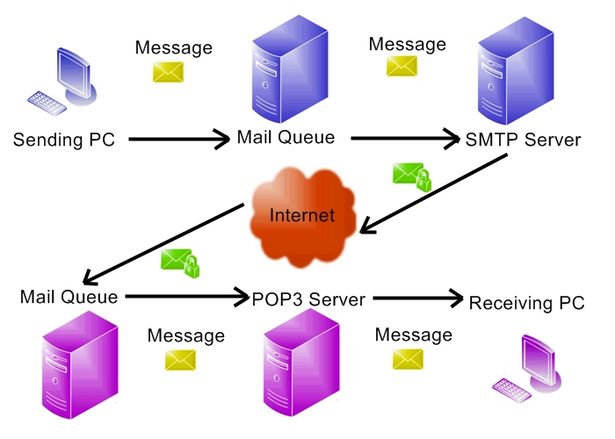
Most mail servers made of Mail delivery agent (MDA) and Mail Transfer Agents (MTA).  MDA software used to routes e-mail to its destination. MTA software used to transfers e-mail between servers or computers. Apart from these, you need to install and use Antispam, Antivirus, Webmail and other software too. You need to make sure your IP address stay clean. Apart from mail server software configuration, you need to install some database to store user names, email IDs, password and other information. Setting up and maintaining a full-fledged email server is a complicated task.

However, you can skip many of configuration problems and setup complete email solution for privacy and security reasons. So, I am going to list important features of software that can turn any Linux, FreeBSD, OpenBSD or Unix-powered into mail server out of a box with the following goals:

  • The software must be open source
  • The software must run on Linux or Unix-like server
  • It must deploy quickly
  • The software setup must be easy for new sysadmin
  •  Software must support multiple users and multiple domain names
  • Must promote privacy and decentralization

You can take back control of your email with this easy-to-deploy our 4hostings service

4hostings lets you become your own mail service provider in a few easy steps. It’s sort of like making your own gmail, but one you control from top to bottom. Technically, 4hostings turns a fresh cloud computer into a working mail server. But you don’t need to be a technology expert to set it up. It implements modern mail protocols (SPF, DKIM, and DMARC) and the latest security best practices, including opportunistic TLS, strong ciphers, and HSTS. When enabled, DNSSEC (with DANE TLSA) provides a higher level of protection against active attacks. Exchange ActiveSync is also available as a beta feature.

4hostings systems feature

  1. Spam filtering
  2. TLS/SSL
  3. Manage your calendars (CalDAV), address books (CardDAV), tasks on a easy to use web UI or your mobile devices (iOS, Android, BlackBerry 10, Windows Phone)
  4. SpamAssassin, ClamAV, SPF, DKIM, greylisting, whitelisting, blacklisting. Quarantining detected spam into SQL database for further review
  5. Stores mail accounts in your favourte backend: OpenLDAP, MySQL, MariaDB, PostgreSQL
  6. Web mail
  7. Web admin panel

We are very happy to see you’re globally interested by this  4hostings system. Do not hesitate to give your feedback.

Open Source Mail Servers Solutions for Linux and UNIX servers

Website speed test

The speed of a website can be a critical factor to its success. Faster loading websites can benefit from higher SEO rankings, higher conversion rates, lower bounce rates, longer visitor duration on site, better overall user experience, and engagement.

For website speed test it is important part to understand a few idea behind how these tools work so that you can better analyze the data and then optimize your site accordingly. It is not only for test the speed of your web, but also you can measure your performance

Here are just a few of common ways to increase website speed

Time to First Byte (TTFB)

Time to first byte (TTFB) is the measurement of the responsiveness of a web server. Essentially it is the time it takes your browser to start receiving information after it has requested it from the server. By using a speed tool you can dramatically minimize the force of the load on your origin server, it helps to decrease your TTFB.

Render-Blocking Javascript & CSS

Blocking refers to Javascript and CSS that are keeping your page from loading as quickly as it could.

Javascript

Google consult removing JavaScript that interferes with loading the above the fold content of your webpages.

You will then also want to optimize your CSS delivery to keep it from causing delays on page load. Here are a few ways to fix this:

  1. Properly call your CSS files
  2. Reduce the amount of CSS files
  3. Use less CSS overall

CSS is a render blocking resource, get it down to the client as soon and as quickly as possible to optimize the time to first render!

Reduce of Resources

Reduce of resources means removing unnecessary characters from your HTML, Javascript, and CSS that are not required to load, such as:

  • White space characters
  • New line characters
  • Comments
  • Block delimiters

This speeds up your load times as it reduces the amount of code that has to be requested from the server.  To remove all the unnecessary characters, you can use a tool. Or if you are running WordPress you can use a plugin which will minify all of your HTML, Javascript, and CSS for you.

HTTP Requests

When your browser brings data from a server it does so using HTTP (Hypertext Transfer Protocol). It is a request/response between a client and a host. In usual the more HTTP requests your web page makes the slower it will load.

There are many ways that can reduce the number of requests such as:

  • Combining your CSS and Javascript files
  • Inline your Javascript (only if it is very small)
  • Using CSS Sprites
  • Reducing assets such as 3rd party plugins that make a large number of external requests

Here presents some website speed test tools, which helps you to test your site’s speed

Pingdom tool

Pingdom

Pingdom offers cost-effective and reliable uptime and performance monitoring for your websites.They use more than 70 global polling locations to test and verify our customers’ sites 24/7, all year long. With Pingdom you can monitor your website’s uptime, performance, and interactions for a better end-user-experience.

SPEEDTEST

SPEEDTEST

Speedtest by Ookla is the definitive way to measure your internet performance. With billions of active uses to date, Speedtest is the dominant global leader in internet performance testing and metrics.

KeyCDN tool 

KeyCDN

KeyCDN is a powerful and easy to use Content Delivery Network (CDN) made to satisfy your needs!Speed up your games, software delivery, advertisements, CMS, websites and many more.

Monitis Website Speed Test

Monitis Website Speed Test

Everyone knows how annoying slow loading websites can be. In fact, web pages take longer than 20 seconds to load,lose 50% of users. Fast and optimized pages guarantee better conversions, higher sales and number of visitors.

Yellow Lab tools

Yellow

 PageScoring 

PageScoring

Website Speed Test is an online web tool by PageScoring.com to provide webmasters with valuable information about the loading speed of their domain and website. This tool will check everything from your domain resolving speed to your download times.

WebPagetest is an open source project that is primarily being developed and supported by Google as part of  efforts to make the web faster.

These tools help you to measure your website speed

Order-Now-4Hosting

Website speed test

Best Web Hosting

4Hostings are using highly configured server best web hosting for best performance and service but we are proudly using reliable open source software for managing our server.

Our best web hosting features:

Open source control panel: Our control panel is easy to use open source web hosting control panel that currently supports ubuntu Linux

Open source webmail: Our open source webmail is a browser-based multilingual IMAP client with an application-like user interface. It provides the full functionality you expect from an email client, including mime support, address book, folder manipulation, message searching and spell checking.

Endpoint security: In network security, endpoint security refers to a methodology of protecting the corporate network. When accessed via remote devices such as laptops or other wireless and mobile devices.

File manager: File manager is a software program that helps a user manages all the files on their server. For example, all file managers allow the user to view, edit, copy and delete the files on their computer.
• FREE DAILY BACKUPS
• WORLD-WIDE-WIDE SERVICES
• 24/7 CUSTOMER SUPPORT
• 99.5% UP-TIME GUARANTEE
• FREQUENTLY ASKED QUESTIONS
• SERVER SECURITY

Visit our website: https://www.4hostings.com/Best web hosting

Best Web Hosting

Web Hosting Companies

4Hostings dependable Web Hosting Companies keeps your website up and running. Featuring 99.5% uptime guarantee and we provide 24/7 technical support!

HOSTING FEATURES:

Open source control panel: Our control panel is an easy to use open source web hosting control panel that currently supports ubuntu Linux.
Open source webmail: Our open source webmail is a browser-based multilingual IMAP client with an application-like user interface. It provides the full functionality you expect from an email client. And it includes mime support, address book, folder manipulation, message searching and spell checking.
Endpoint security: In network security, endpoint security refers to a methodology of protecting the corporate network. When accessed via remote devices such as laptops or other wireless and mobile devices.
File manager: File manager is a software program that helps a user manage all the files on their server. For example, all file managers allow the user to view, edit, copy and delete the files on their computer.

• FREE DAILY BACKUPS
• WORLD-WIDE-WIDE SERVICES
• 24/7 CUSTOMER SUPPORT
• 99.5% UPTIME GUARANTEE
• FREQUENTLY ASKED QUESTIONS
• SERVER SECURITY

Visit For Details: http://www.4hostings.com/
Web Hosting Companies

Web Hosting Companies